
7 Best Heated Desk Pads & Mouse Pads 2027 (Plus a Heated Mouse)
The 7 best heated desk pads and mouse pads in 2027 are:
- Voltiefy Desk Pad
- HAOCOO Desk Mat
- Konohan Desk Mat
- tulpock Desk Pad
- UMySpcl Desk Pad
- IriQuart Hand Warmer
- Flylin Heated Mouse
Personally, my top pick is the Voltiefy heated desk pad.
It is big enough for your keyboard and mouse, it has 5 heat settings from 95°F to 135°F with a display, and it switches off on its own after 3 hours.
Are you tired of cold hands while working on the computer? I have a few solutions for you to stop this problem: you can use a warm desk mat, a warm mouse pad, a heated mouse, or a mix.
This is an easy way to bring heat right to your hands, keeping them warm while working in an office, at home, or even on the go with a laptop.
Heated mouse pads have changed a lot. Today, most of them are big desk pads that warm your keyboard and mouse at the same time, so most of my picks this year are desk pads, plus a classic pocket pad and a heated mouse.
Check out my top picks below. If you have any questions about the products, you can leave them down below.
Voltiefy Desk Pad
Company: Voltiefy
Price: $
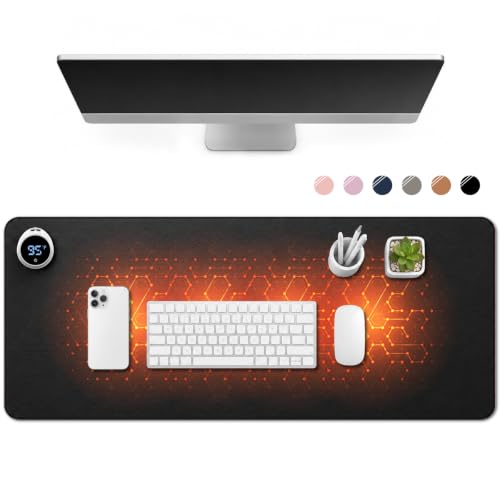
The Voltiefy is a big heated desk pad, 31.5 by 13 inches, so it fits under your keyboard and your mouse at the same time. Both hands stay warm, not just your mouse hand.
It has a digital control panel with a display and 5 heat settings: 95°F, 105°F, 115°F, 125°F and 135°F. Five clear steps make it easy to find the warmth you like, from a light warm touch to a really toasty pad on a freezing morning.
Voltiefy says an NTC chip keeps the heat even across the pad, with metal heating elements inside. The surface is water-resistant PU with a scratch-resistant film, and the housing of the control is flame-retardant ABS.
There is a 3-hour auto shut-off, so if you forget to turn it off before you leave your desk, it switches off on its own. That is the kind of safety feature I want on anything that heats.
I also like the 1-hour sedentary reminder light. It is a small nudge to get up, stretch and refill your water, which most of us forget to do on busy days.
The listing says you can also use it to warm your pet. Cats love warm keyboards anyway, so maybe this will keep yours off your laptop! Just never leave a pet alone with it switched on.
Voltiefy is not a well-known brand, but on paper, this pad has everything I look for: a big size, clear temperatures, an auto shut-off and a low price. That is why it is my top pick.
What I like:
- A big size for the keyboard and mouse.
- Five heat settings with listed temperatures.
- A 3-hour auto shut-off.
Features:
- Size: 31.5 x 13 inches.
- 5 settings: 95, 105, 115, 125 and 135°F, digital display.
- 3-hour auto shut-off.
- NTC chip for even heat, metal heating elements.
- Water-resistant PU, scratch-resistant film, flame-retardant ABS housing.
- 1-hour sedentary reminder light.
Keep in mind:
- 135°F is warm, so start low and turn it up slowly.
- The info I have doesn’t say if it plugs into the wall or a USB port, so check the listing before you buy.
Fair warning: Voltiefy is a little-known brand, so check the return window on the listing.
Best for: Most people, the best all-rounder

HAOCOO Desk Mat
Company: HAOCOO
Price: $
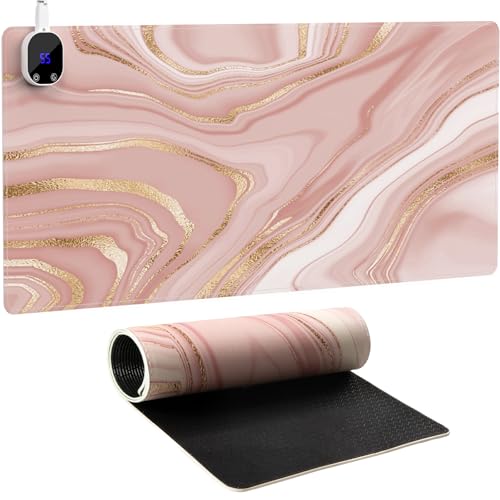
If you hate waiting for things to warm up, the HAOCOO is a good pick. The brand says it gets warm in about 15 seconds, so your hands feel the heat almost as soon as you sit down.
It has a digital display and 4 heat settings from 104°F to 131°F. That range starts a little warmer than the Voltiefy and tops out a bit lower, which is plenty for most offices.
It is the same big 31.5 by 13 inch size, so your keyboard, mouse and even a notebook fit on it. The 4-hour auto-off switches it off on its own if you forget.
HAOCOO says the mat is waterproof and has robust stitching around the edges. Stitched edges matter on a desk mat, because they help the edges stay neat instead of curling or fraying over time.
One thing I really like: when the heat is off, it works as a normal mouse mat. So you can leave it on your desk all year and just turn on the heat when the weather gets cold.
HAOCOO is another lesser-known brand. But if a quick warm-up and an all-year desk mat sound good to you, this is a great, cheap choice for a home office or a cold cubicle.
The display is a small thing that makes a big difference. You can see the level at a glance instead of guessing, which is handy when you share a desk at home with a partner or a teen.
What I like:
- Warm in about 15 seconds.
- Works as a normal mouse mat when it is off.
- Stitched edges.
- A digital display.
Features:
- Warm in about 15 seconds (brand claim).
- 4 settings: 104–131°F, digital display.
- 4-hour auto-off.
- Size: 31.5 x 13 inches.
- Waterproof, robust stitching.
Keep in mind:
- Four settings are fewer than on the Voltiefy, Konohan or UMySpcl.
- Waterproof means spills wipe off, but still unplug it before you clean it.
- The info I have doesn’t say if it plugs into the wall or a USB port.
Fair warning: HAOCOO is a little-known brand, so check the seller and return policy before you buy.
Best for: Fast warm-up on cold mornings
Konohan Desk Mat

Company: Konohan
Price: $$
Most desk pads come in plain black or gray. Konohan offers several colors, like gray-green, so you can match the mat to your home office or just make your desk a little prettier.
It has 5 heat levels: 86°F, 95°F, 104°F, 113°F and 122°F. The lowest setting is very mild, which is nice if you only want a little warmth or if your office is not that cold.
There is a 4-hour auto shut-off, so it won’t stay on all night if you forget it. The surface is PU leather, and the bottom is anti-skid, so the mat doesn’t slide when you move your mouse fast.
It has a US plug and runs on 110V only. That is fine in the US, but it is not a pad to take on a trip abroad.
I like that Konohan is clear about safety in its listing. It says not to leave the mat running unattended, and not to fold it or cover it while it is on. Those are good rules for any heated pad.
Konohan is not a big brand, so this is a pick for its colors and its gentle heat range. If you want a heated desk mat that looks nice and warms gently, this is the one I would choose.
A gentle range is also nice for spring and fall, when the office air conditioning is too cold but you don’t want a hot pad. And it makes a pretty gift for a friend with a cozy home office.
What I like:
- Several colors to choose from.
- A very gentle lowest setting.
- An anti-skid bottom.
- Clear safety notes in the listing.
Features:
- 5 levels: 86, 95, 104, 113 and 122°F.
- 4-hour auto shut-off.
- PU leather, anti-skid bottom.
- US plug, 110V only.
- Several colors, like gray-green.
Keep in mind:
- Don’t fold it or cover it while it is on.
- The lowest setting is very mild, so if you are always cold, use the higher levels.
- Check the size on the listing; the info I have shows two different sizes, so measure your desk.
Fair warning: it works on 110V only, so it is not for travel outside the US.
Best for: Choosing a color for your desk
tulpock Desk Pad

Company: tulpock
Price: $$
If safety is your first question, look at the tulpock.
Its listing says the pad is UL and FCC certified, which is nice to see on a small heated product from a little-known brand.
Certifications don’t make a product perfect, but on a cheap heated pad, I see them as a good sign. It is also a good fit for an office that asks about certifications before you plug things in.
It has 3 heat levels, shown by color: blue, green and red. The range is 104°F to 122°F, so even the top setting stays on the gentle side, and you can see the level at a glance by its color. There is a 4-hour auto shut-off as well.
The surface is PU leather with waterproof PVC, so it feels smooth under your wrist and spills wipe right off. It is the standard 31.5 by 13 inch size.
The control box sits at the left corner. That is a smart place for most people, because it stays out of the way of your mouse hand.
Just know that tulpock says not to use it on glass. If you have a glass desk, this is not the pad for you, and I would read the instructions of any other heated pad before using it on glass too.
With only 3 levels, it is simpler than the Voltiefy. But for anyone who wants a basic, gentle desk pad with certifications listed, it is an easy choice, and still at a small price.
What I like:
- UL and FCC certified, according to the listing.
- Colored levels that are easy to see.
- The control box sits out of the way.
Features:
- UL and FCC certified (per the listing).
- 3 levels: blue, green, red, 104–122°F.
- 4-hour auto shut-off.
- PU leather + waterproof PVC.
- Size: 31.5 x 13 inches.
Keep in mind:
- Don’t use it on a glass desk.
- Three levels give you fewer choices than five.
- The info I have doesn’t say if it plugs into the wall or a USB port.
Fair warning: the top setting is 122°F, so if you want a really hot pad, the Voltiefy goes higher.
Best for: Peace of mind on safety
UMySpcl Desk Pad

Company: UMySpcl
Price: $$
UMySpcl says the heat covers about 95% of the surface. That matters on a big pad, because you want your keyboard hand to feel just as warm as your mouse hand, wherever you put them.
The brand also says it starts warming in about 5 seconds, which is the fastest claim on this list. You barely have time to log in before you feel it.
It has 5 heat levels: 86°F, 95°F, 104°F, 113°F and 122°F, the same steps as the Konohan. So you get a very mild lowest setting and a comfortable top setting. It also works in a room that is only a little cool.
There is a 4-hour auto shut-off and a 1-hour sedentary reminder, just like the reminder light on the Voltiefy. It is a gentle nudge to stand up and move a little.
The surface is PU leather, the base is non-slip, and the pad is 31.5 by 13 inches. It is a 110V plug-in pad, so you need a wall outlet near your desk.
UMySpcl is a little-known brand with a hard-to-remember name, but the features are solid. If even heat and a fast start are what you want most, this is a great choice.
Even heat is also nice if you move around your desk a lot, from typing to writing by hand. Wherever your hands rest, the pad should feel warm. It is a good match for a wide keyboard, too.
What I like:
- Heat across about 95% of the surface.
- Starts warming in about 5 seconds.
- A sedentary reminder.
- A very mild lowest setting.
Features:
- 5 levels: 86, 95, 104, 113 and 122°F.
- Heat across about 95% of the surface.
- Starts warming in about 5 seconds (brand claim).
- 4-hour auto shut-off + 1-hour sedentary reminder.
- PU leather, non-slip base, 31.5 x 13 inches, 110V.
Keep in mind:
- It plugs into the wall, so you need an outlet close to your desk.
- 110V means it is made for US outlets.
- The heat coverage and warm-up time are brand claims.
Fair warning: UMySpcl is a little-known brand, so check the return policy on the listing.
Best for: Even heat across the whole pad
IriQuart Hand Warmer

Company: IriQuart
Price: $
This is the classic heated mouse pad: a small pad with a warm pocket that you slide your mouse hand into. If you only get cold in your mouse hand, or you don’t have room for a big desk pad, this is the style for you.
It is USB powered, so you can plug it into a laptop, a power bank or a USB adapter. That makes it easy to take with you, from the office to the couch to a hotel desk.
It has 3 heat levels: 110°F, 130°F and 145°F. That top setting is the warmest on this list, so it is great for really cold hands. Start low, because your hand is right inside the warm pocket.
There is an auto shut-off you can set to 2, 4 or 8 hours. The longer option is nice for a full workday, and the short one is good if you only use it in the morning.
From my old list of pocket-style pads, one tip still stands: make sure your mouse fits inside. A big ergonomic mouse may feel cramped in a small pocket. Both wired and wireless mice can work in this style of pad.
IriQuart is a little-known brand, but this style of pad is simple and cheap. It is also a cute little gift for a coworker who is always cold.
It is great for laptop users who work from the kitchen table or a chilly coffee shop, too, since all you need is a USB port.
What I like:
- Wraps your mouse hand in a warm pocket.
- USB powered, so it goes anywhere.
- Auto shut-off at 2, 4 or 8 hours.
Features:
- USB powered (laptop, power bank or adapter).
- 3 levels: 110°F, 130°F and 145°F.
- Auto shut-off: 2, 4 or 8 hours.
- Hand-in pocket design.
Keep in mind:
- It only warms your mouse hand, not your keyboard hand.
- 145°F is hot inside a closed pocket, so start on the lowest level.
- A pocket may feel a little bulky if you move your mouse a lot.
Fair warning: check that your mouse fits inside the pocket before you buy.
Best for: The classic hand-in pocket style
Flylin Heated Mouse
Company: Flylin
Price: $
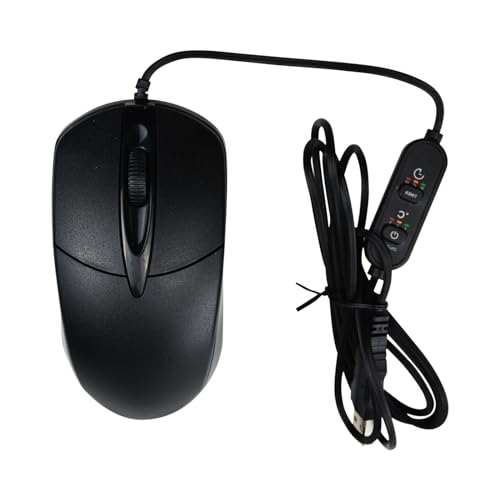
My old list had a whole section of heated mice. They are still sold, but there are fewer of them now, mostly from small brands, and the ValueRays mice from my old list had no seller offer when I checked. The Flylin is a wired USB mouse with a built-in heating chip, so the warmth is right in your palm.
It has 3 temperature levels and 3 timer levels, so you can choose how warm it gets and how long it stays on. That is a nice safety touch for something you hold all day, and you can set a low heat for a long time.
As a mouse, it has a 1600 DPI optical sensor and a 3D scroll wheel. It is shaped for the right hand, so it is not for lefties.
It works with Windows PCs and laptops over USB. Because it is wired, you don’t need batteries, and the same cable powers the heat.
A heated mouse is a nice choice if you don’t want anything extra on your desk. It also pairs well with a warm desk pad: the pad warms your keyboard hand, and the mouse warms your mouse hand.
Flylin is not a known brand, and stock looked low when I checked, so it may sell out. If it is gone, look for another wired USB heated mouse with timer levels.
It is a nice option for a small desk, a laptop setup or a shared workspace, where a big desk pad would be too much. For everyday work, 1600 DPI is plenty, but it is not a gaming mouse.
What I like:
- Heat right in your palm.
- 3 temperature levels and 3 timer levels.
- No batteries to charge.
- A right-hand ergonomic shape.
Features:
- Wired USB, built-in heating chip.
- 3 temperature levels + 3 timer levels.
- 1600 DPI optical, 3D scroll.
- Right-hand ergonomic shape.
- For Windows PCs and laptops.
Keep in mind:
- It is made for the right hand.
- The info I have only mentions Windows, so check the listing if you use a Mac.
- The listing doesn’t give exact temperatures.
- It is wired, so the cable needs to reach your computer.
Fair warning: it is a little-known brand, and stock was low when I checked.
Best for: A warm mouse right in your hand
Quick Comparison
| Product | Best for | Key feature |
|---|---|---|
| Voltiefy Desk Pad | Most people, the best all-rounder | 5 settings 95–135°F, 3-hour auto-off |
| HAOCOO Desk Mat | Fast warm-up on cold mornings | Warm in about 15 seconds, 4-hour auto-off |
| Konohan Desk Mat | Choosing a color for your desk | 5 levels 86–122°F, several colors |
| tulpock Desk Pad | Peace of mind on safety | UL and FCC certified (per the listing) |
| UMySpcl Desk Pad | Even heat across the whole pad | Heat across about 95% of the surface |
| IriQuart Hand Warmer | The classic hand-in pocket style | USB, 3 levels up to 145°F |
| Flylin Heated Mouse | A warm mouse right in your hand | Built-in heating chip, 1600 DPI |
How I Picked These
I started with my old list of mouse pads and heated mice. None of those 9 products are sold anymore, so every pick here is new.
I picked them by the details the brands share on Amazon: size, heat levels and listed temperatures, auto shut-off, power, surface, safety notes and price. All of these brands are little-known, which is normal for this kind of product, and I say so in each review.
I have not tested these pads myself, and I don’t repeat Amazon reviews or scores. When a number comes from the brand, I say so.
Heated Desk Pad, Heated Mouse Pad or Heated Mouse?
Warm mouse pads have changed a lot since I first wrote about them. Here are the three main types you can buy now.
- Heated desk pad (desk mat): a big pad, usually 31.5 by 13 inches, that goes under your keyboard and mouse. Both hands stay warm. Many plug into the wall and have a control with several heat levels.
- Pocket heated mouse pad: a small pad with a warm cover that you slide your hand into, like the IriQuart. It warms only your mouse hand, but it wraps it in a warm pocket, and it runs on USB.
- Heated mouse: a mouse with a heating element inside, like the Flylin. Nothing extra on your desk, and the warmth is right in your palm.
If both hands get cold, I would start with a heated desk pad. If only your mouse hand gets cold, a pocket pad or a heated mouse is enough, and you can also use both together.
What Are the Benefits of Using a Heated Desk Pad or Mouse Pad?
Using a warm mouse pad or a heated mouse will give you many more benefits than using a regular one. Take a look at the benefits you will get with your heated mouse, mouse pad or desk pad.
Provides Great Heat
One of the best benefits of a mouse pad or heated mouse is the great heat that comes off it when it is on. If you work in a cold office, or you just don’t like to be cold when using the computer, then you will love this.
Pocket mouse pads and heated mice usually get their power from the USB port on the computer. You plug them in, and they start to heat up. Many big warm desk mats plug into the wall and have a control box with several levels.
Affordable
All of the desk pads, mouse pads and the heated mouse on this list are very affordable. Most heated gear items have skyrocketing prices, but not these. A desk pad costs a lot less than a pair of heated gloves.
Cold Hands, Arthritis and Raynaud’s
Many people with cold hands, arthritis or Raynaud’s look for heated desk gear, and the warmth can make long hours at the computer feel more comfortable.
But a heated pad is not a medical product, and I can’t promise it will help a health condition. If you have arthritis, Raynaud’s, diabetes or poor feeling in your hands, ask your doctor before using heat.
How to Choose a Heated Desk Pad or Mouse Pad
1) Size
Most heated desk pads on this list are 31.5 by 13 inches, big enough for a keyboard and a mouse. Measure your desk first, especially if you have a small desk or a keyboard tray.
2) Heat Levels and Temperatures
Look for a pad that lists its temperatures. On this list, the lowest setting starts at 86°F on the Konohan and the UMySpcl, and the warmest setting is 145°F on the IriQuart pocket pad. More levels make it easier to find the warmth you like.
3) Auto Shut-Off
This is the safety feature I would never skip. Every pad on this list has one: 3 hours on the Voltiefy, 4 hours on most others, and 2, 4 or 8 hours on the IriQuart.
4) Power: Wall Plug or USB
Big desk pads like the Konohan and the UMySpcl plug into a 110V wall outlet. Pocket pads and heated mice run on USB, so they work with a laptop or a power bank and are easier to take with you.
5) Surface and Cleaning
PU leather and waterproof surfaces wipe clean easily, which is great if you drink coffee at your desk. Look for a non-slip or anti-skid bottom, so the pad stays put.
6) Fit for Your Mouse
For pocket-style pads, make sure your mouse fits inside. Some covers are small, and depending on the size, you may need a smaller mouse. Both wired and wireless mice work on a desk pad.
7) Design
Heated mouse pads used to come with cute kitty, panda and paw designs, and they add a fun element to your office. Today’s desk pads are simpler, but some, like the Konohan, come in several colors.
How to Use a Heated Desk Pad Safely
- Read the manual and follow the brand’s instructions.
- Start on the lowest level and turn it up slowly.
- Don’t fold the pad or cover it while it is on, and don’t leave it running unattended.
- Check whether your pad can be used on glass. tulpock, for example, says not to.
- Unplug it when you leave your desk and before you clean it.
- Don’t use it if the cable or the control looks damaged.
More Ways to Stay Warm at Your Desk
Warm hands are great, but a cold office usually means cold feet too. An electric foot warmer under the desk or a pair of heated slippers at home helps a lot.
For your commute, heated gloves or rechargeable hand warmers keep your hands warm on the way in.
And if you sit all day, a heated massage office chair warms your back.
Heated Desk Pad and Mouse Pad FAQ
1) Question: What Is the Best Heated Desk Pad?
Answer:
Personally, my top pick is the Voltiefy, a 31.5 by 13 inch warm desk mat with 5 listed heat settings, a display and a 3-hour auto shut-off.
2) Question: Do Heated Mouse Pads Really Work?
Answer:
Yes, they keep your hands warmer while you work. A heated desk pad warms both hands, and a pocket mouse pad wraps your mouse hand in warmth.
3) Question: How Hot Do Heated Desk Pads Get?
Answer:
It depends on the pad. On this list, the top settings go from 122°F on the Konohan, tulpock and UMySpcl to 135°F on the Voltiefy. The IriQuart pocket pad goes up to 145°F.
4) Question: Are Heated Desk Pads Safe?
Answer:
Yes, when used as the brand says. Choose one with an auto shut-off, don’t fold or cover it while it is on, and unplug it when you leave.
5) Question: Can I Leave a Heated Desk Pad On All Day?
Answer:
Most of them switch off on their own after 3 or 4 hours. Don’t leave one running unattended, and turn it off when you leave your desk.
6) Question: Do Heated Mouse Pads Use USB?
Answer:
Pocket mouse pads like the IriQuart and heated mice like the Flylin use USB. Big warm desk mats like the Konohan and UMySpcl plug into a 110V outlet.
7) Question: Can I Use a Wireless Mouse on a Heated Mouse Pad?
Answer:
Yes. Both wired and wireless mice work on a big desk pad. For a pocket pad, just make sure your mouse fits inside.
8) Question: Can I Use a Heated Desk Pad as a Regular Mouse Pad?
Answer:
Yes. HAOCOO, for example, says its mat works as a normal mouse mat when the heat is off, so you can keep it on your desk all year.
9) Question: Is a Heated Mouse Better Than a Heated Mouse Pad?
Answer:
A heated mouse warms your palm and takes no extra space. A desk pad warms both hands. If both hands get cold, the desk pad is the better choice.
10) Question: Can a Heated Desk Pad Warm My Pet?
Answer:
Voltiefy says its pad can also warm pets. Use a low setting, and never leave a pet alone with a pad that is switched on.
11) Question: Do Heated Mouse Pads Help Arthritis?
Answer:
Warmth can feel comfortable, but I can’t promise it will help a health condition. If you have arthritis or Raynaud’s, ask your doctor before using heat.
Conclusion
Did you find a desk pad, a mouse pad or a heated mouse to your liking? Did you find an option for both hands?
I hope this best heated desk pads and mouse pads 2027 guide helped to solve the problem of your cold hands while you browse the internet and work on the computer.
If you have any questions at all, please leave them down below so I can get back to you as soon as possible. Also, let me know how you like your desk pad, mouse pad or heated mouse.
About Author

Kate Janelle
Photography enthusiast and creator at Digital World Beauty. My main objective is to create a valuable resource for you with honest tech gear reviews, course recommendations, and how-to tutorials.